how can i download movies on my macbook
If yous're a proud possessor of a Mac and a moving picture enthusiast, Netflix presents the perfect streaming service to assist y'all keep upward with trending movies and Television receiver shows. Y'all can even download your favorites and enjoy them on the go. Just to do so, yous need the Netflix app.

Sadly, Netflix hasn't released an app for Mac, and so you tin can't download the content. Then does that mean your dream to watch your favorite content while offline is gone? No.
You tin can take advantage of a few legal and safe workarounds and still catch upward with those blockbusters on your Mac even without an internet connection. In this article, we'll share some tips on how you can download movies on Mac.
Is It Possible to Watch Netflix Offline on Mac?
Since its invention, Netflix has proved to exist an innovative streaming service that offers a vast library of movies and Television set shows. You can find only about anything you want to watch, from the trending programs to obscure classics from years by. One of the features that endear Netflix to movie enthusiasts is the ability to download movies. Y'all can save your favorite movies in your local storage and watch them whenever you lot want.
Although Netflix hasn't nonetheless released an app version compatible with MacOS, you can still savour your movies offline, cheers to several proven workarounds. Let's now wait at the different means you can download movies on your Mac.
Method 1: Use QuickTime Thespian
Before trying anything complex, it may be helpful to expect closer to home. Netflix has already developed an app for other devices in the larger Apple family, including iPhone, iPad, and iPod Touch. These apps come with a download option. You lot can save your movies on your local storage and scout them later, even without an internet connection. Most importantly, you can then transfer these files to your Mac using QuickTime Player.
QuickTime Actor is a digital media playback tool that comes bundled with the MacOS. Information technology recognizes and plays all of the main video formats. It can as well be used to capture, record, and share movies or music.
Let's encounter how you can play your movies on Mac using QuickTime Actor. We'll demonstrate the necessary steps, assuming you lot're using an iPhone.
- Link your Mac to your iPhone using a USB cable.
- Launch the QuickTime Player on your Mac. You tin can do so via either the Applications folder or the Launchpad.
- Click on "File" in the top right corner and so select "New Movie Recording." Alternatively, y'all can utilise the shortcut "Choice+Command+Northward".
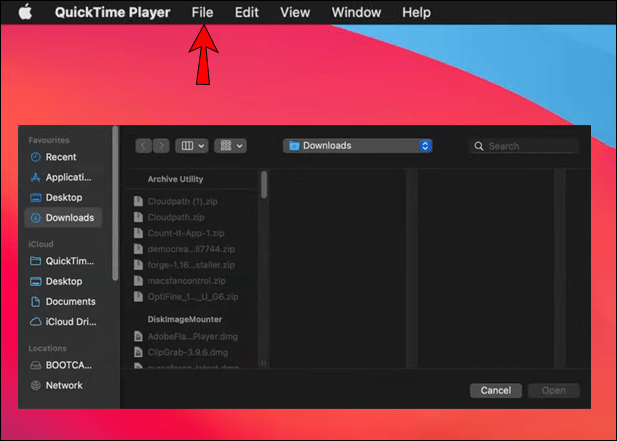
- Open the command panel and click on the pointer icon simply next to the blood-red record push button.
- You now need to instruct QuickTime Player to stream content from your iPhone. To do then, select "iPhone" under "Microphone and Camera."
- Launch the Netflix app on your iPhone then navigate to the moving-picture show or show that you'd similar to stream.
- Click on the record button on the QuickTime Player (on your Mac) and then tap "Play" on your iPhone. At this bespeak, the movie should commencement playing on your Mac via the QuickTime Histrion app. While it plays, the app will be recording everything in the background.

- As shortly as the movie ends, click on the tape button to stop the recording.

- Click on "File" in the top right corner and so select "Save."

Et voila! You've technically downloaded your movie on Mac. Although the video quality may not friction match the Netflix app, you'll exist able to relieve the file in your Mac's local storage.
Method 2: Streaming From an iPad or iPhone
You lot tin stream movies from an iPad or iPhone to your Mac using AirPlay. It's a proprietary protocol stack/suite of application programming interfaces (API) owned by Apple that enables media streaming between devices. One of the best things about AirPlay is that it enables you to stream audio and video from your iOS device to other supported devices like TVs or Mac wirelessly. All you demand is Wi-Fi.
The Netflix app for iOS devices is compatible with AirPlay. This means y'all tin can stream whatsoever movie or TV show that yous download on your iPad or iPhone to your Mac in merely a few clicks. Here's how:
- Make sure at that place's a Wi-Fi connectedness between your iOS device and your Mac.
- Launch AirPlay on your iOS device and tap on "Screen mirroring."

- Select your Mac from the AirPlay menu.

- Launch Netflix on your IOS device and so open the downloaded movie or series y'all'd similar to spotter.
- Click on "Play." At this point, the moving picture should beginning playing on your Mac.
This method technically doesn't allow yous to download whatsoever Netflix content for offline viewing, just it can be a useful workaround, specially for multiple viewers. The downside is that the Wi-Fi network connection tin can accept a toll on the battery life of your devices.
Method 3: Boot Camp and Windows
Netflix has already developed an app for Windows operating systems that allows you to download content on your PC. Although Mac computers primarily run on MacOS, you tin can install Windows 7 (or higher) on your Mac. How tin can y'all do it? The solution is Kicking Camp.
If you're wondering what Boot Campsite is, information technology'due south software developed past Apple tree that allows you to employ both the MacOS and Microsoft Window on your Mac at the same time. If you lot accept two monitors plugged into your Mac, you can open and run Windows and its applications on one screen while running Mac on the other. All hardware and drivers are optimized to ensure that you won't take to buy anything extra. Kicking Camp is especially compatible with Intel-based Mac computers.
Once y'all've installed Windows on your Mac, all yous'll need to do is download and install the Netflix app. You'll and so exist able to download movies or TV shows and watch them later at your convenience. The only downside to this approach is that yous'll need to buy a copy of Windows to install on your Mac.
Boosted FAQs
How exercise I download content from Netflix to an iPad?
Downloading movies and TV shows from Netflix to an iPad is straightforward:
1. Launch the Netflix app and sign in to your account.
2. Browse through the listings to find your desired picture show or show.
3. If your desired selection is a movie, tap on the download push button located simply below the flick'due south description. If yous don't run across any download button, so the movie isn't approved for download.
four. If your desired option is a series, you'll need to download each episode. Once you've opened the series, you lot'll see a list of all the episodes with a download button on the far right.
5. One time yous've downloaded all the items desired, tap on "Downloads" at the bottom of your screen. You'll then meet a list of all your downloads.
Spotter Netflix Without Limitations
Netflix is a great way to relax and scout your favorite movies, simply yous may desire to download the content so that you lot can view it subsequently or share it with friends. Although yous can't download Netflix directly on your Mac, several workarounds are but fine for all Mac computers. Whether you're on a flight or on a train to visit family and friends, nothing should terminate you from enjoying Netflix. Thanks to this article, you now know each workaround. Simply choose the most convenient one and enjoy your favorite shows.
Have you lot tried downloading Netflix on your Mac using any of the approaches discussed in this tutorial? How did it go? Allow us know in the comments section below.
how can i download movies on my macbook
Source: https://www.alphr.com/netflix-how-to-download-movies-on-mac/


Posting Komentar untuk "how can i download movies on my macbook"